Send
Close Add comments:
(status displays here)
Got it! This site uses cookies. You consent to this by clicking on "Got it!" or by continuing to use this website.nbsp; Note: This appears on each machine/browser from which this site is accessed.
Graphviz: dot
1. Graphviz: dot
2. Graphviz
Graphviz is open source graph visualization software. Graph visualization is a way of representing structural information as diagrams of abstract graphs and networks. It has important applications in networking, bioinformatics, software engineering, database and web design, machine learning, and in visual interfaces for other technical domains. From the Graphviz web site at
https://www.graphviz.org/ .
Note that one installs "
Graphviz" but the command to use it (and check the installed version) is
dot.
The default file extension of a Graphviz file is
dot.
Graphviz should already be installed on CentOS but the command is
dot.
The following Linux command(s) install graphviz and dot.
sudo yum -y install graphviz
The following Linux command(s) display the installed version of dot.
dot -V
On
2019-08-14 the output was as follows.
dot - graphviz version 2.30.1 (20180420.1509)
3. Hello world
Here is a "
Hello world" program in GraphViz.
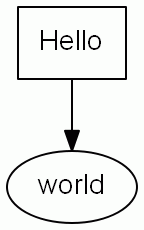
Here is the GraphViz diagram.
Here is the code that creates the diagram.
4. Command
Here is the command to run graphviz and create a png file using the above file. The input file is
hello.dot.
dot -Tpng -ohello.png hello.dot
The output file is
hello.png.
5. Dots per inch
The following command can be used to set the
DPI (
Dots Per Inch) of the image.
dot -Tpng -Gdip-300 -ohello.png hello.dot
Note: The following line could be added to the graph code, but it is often better (for automation) to set it from the command line.
graph [ dip = 300 ] ;
There are many other settings that can be used.
6. SVG
A raster image, such as a in the format
PNG (
Portable Network Graphics) , pixelizes as the image is scaled.
A vector format such as
SVG (
Scalable Vector Graphics) does not have this effect.
Here is a GraphViz command to create a SVG file.
$dot -Tsvg -ohello.svg hello.dot
7. End of page
8. Acronyms and/or initialisms for this page
3 acronyms omitted (login required)
