Send
Close Add comments:
(status displays here)
Got it! This site uses cookies. You consent to this by clicking on "Got it!" or by continuing to use this website.nbsp; Note: This appears on each machine/browser from which this site is accessed.
Case study: String rewriting
1. Case study: String rewriting
This page describes the string rewriting capability for documents as part of a financial printing document model. The general concept is that of abstraction to remove similarities as fill-in field placeholders and reduction to replace those similarities with the values of the fill-in fields.
The fill-in field capability is a special type of rewriting system known as a string rewriting system. Any parameterization is handled by the XSL code.
2. PDF documents
Financial documents were required to be created and published for clients. The red markings are parts whose formatting was not yet finalized. Custom charts and graphics appear throughout the document. Comments from clients, etc., appear in places that are to be adjusted.
These documents were published in many languages including Chinese, Japanese, Korean, etc., using many character set and font variations.
(PDF page)
(PDF page)
(number chart)
(bar chart)
3. System model
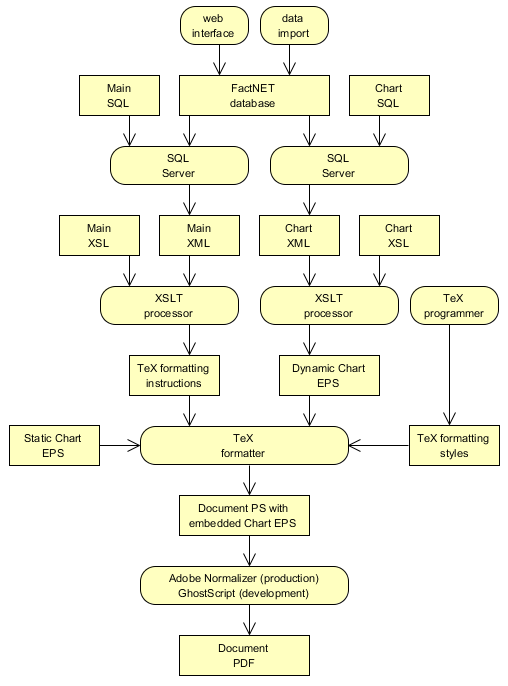
Here is a data flow diagram of the system that was used from about 2009 until about 2017 when the company split into three parts and new management decided to go in a new direction.
4. Monikers
The /CC term "moniker" is this system was used for the name of a fill-in field despite the common definition of a "moniker" as "a familiar name or nickname for a person".
Microsoft uses the term "moniker" in certain API's to describe objects that act as identifiers. In the usage described on this page, names are used to act as text. "In Common Object Model (COM), a moniker is a standard mechanism for encapsulating the location and binding of another COM object. The textual representation of a moniker is called a display name."
Thus, what here, for historical reasons, is called a "moniker" is, in Microsoft terminology, a "display name".
5. Name value pairs
All the values of
name1,
name2, etc., are loaded into a name-value pair environment in the XSL before beginning the output of the document. The following is an abstract example.
name1=text1
name2=text2
name3=text3
...
6. XSL
The XSL may then output the following as part of the document.
...[name1]...
Note: In the actual system, post-processing C# code, as part of the XSL (and extensions) did the actual text replacement, supporting both monikers, monikers containing with monikers, etc.
7. Evaluation
The text value of name1 is substituted into the document at the place where [name1] appears. This is done recursively so that the defined text of a fill-in field name can contain other fill-in field names.
The recursion is limited so as to insure the termination of evaluation. Any cyclic reference is considered and error and is terminated by this limited recursion. This is similar to a cyclic reference in a spreadsheet being and error.
8. Specific example
As a specific example, consider the following environment.
AMOUNT_VALUE=100
CURRENCY_SYMBAL=$
CURRENCY_TEXT=dollar
CURRENCY_PLURAL=[CURRENCY_TEXT]s
Consider the following text.
The total amount is [CURRENCY_SYMBOL][AMOUNT_VALUE] in [CURRENCY_PLURAL].
This text is evaluated (i.e., reduced), given the previous environment, to the following.
The total amount is $100 in [CURRENCY_TEXT]s.
This text is further reduced to the following.
The total amount is $100 in dollars.
When no further reduction can be done the text is said to have reached a "
fixed point" (in reduction space) and is said to be in "
normal form".
9. Overrides
The way in which the environment is created allows newer values to replace older values. This provides a way to have the following hierarchy of values.
XSL default value
system database admin fund-level value
system database admin share-level value
system database client fund-level value (with nicer interface)
system database client share-level value (with nicer interface)
XSL override value
The last value specified is the value used in the document.
10. End of page
